



During long-term operation, cribles à trommel are prone to various malfunctions due to factors such as material characteristics, operating methods, and maintenance conditions. The following details common problems, their causes, and targeted solutions, categorized into three main areas: abnormal screening performance, abnormal equipment operation, and transmission system failures.
1. Abnormal Screening Performance
Effective screening is critical for optimal production quality and yield. However, common disruptions—such as oversized particles in fine material, sudden drops in throughput, or spillage from drum edges—can severely impact operation efficiency. These issues often stem from improper mesh sizing, feed imbalance, or structural wear. Addressing them requires methodical troubleshooting and corrective adjustments.
(1) Screened Product Contains Large Impurities
Common Causes
- Screen mesh damage (local mesh tearing or loose seams), large materials leak out from the damaged area.
- Incorrect screen mesh size selection (e.g., requiring screening of materials smaller than 5mm, but using a 10mm screen).
- Drum rotation speed is too fast or too slow (too fast causes materials to be discharged before screening is complete, too slow causes material accumulation and prevents dispersion).
Solutions
- Stop the machine and inspect the screen mesh, repair damaged areas (weld or replace damaged sections with mesh of the same specification), and re-tighten seam bolts (spacing ≤10cm).
- Replace the screen mesh with the corresponding mesh size according to material requirements (e.g., 20-40 mesh for fine sand, 5-10 mesh for coarse aggregate).
- Adjust the rotation speed (through a variable frequency motor or by replacing the gearbox gears), generally controlling the drum rotation speed at 10-15 r/min (refer to the equipment manual for specifics; for sticky materials, the speed can be appropriately increased to prevent clogging).
(2) Sudden Decrease in Output
Common Causes
- Severe screen mesh clogging (viscous materials such as clay and sludge adhere to the mesh openings, or fibrous materials become entangled in the mesh surface).
- Inlet blockage (material clumping or large pieces blocking the inlet channel).
- The drum tilt angle is too small (materials remain in the drum for too long, leading to accumulation at the rear and hindering feeding).
Solutions
- Clean the screen: Use a high-pressure water gun to rinse (suitable for sticky materials), manually remove clumps, or install an automatic screen cleaning device (such as rubber balls or brushes).
- Unblock the feed opening: After stopping the machine, crush the clumped material, check the hopper for foreign objects (such as metal blocks), and if necessary, install a grate at the feed opening (with a mesh size slightly larger than the upper limit of the screen mesh).
- Adjust the tilt angle: Increase the tilt angle of the drum by 1-3 degrees using the adjusting bolts at the bottom of the frame (the normal angle is generally 3-5 degrees; it can be reduced for easily flowing materials and increased for sticky materials).
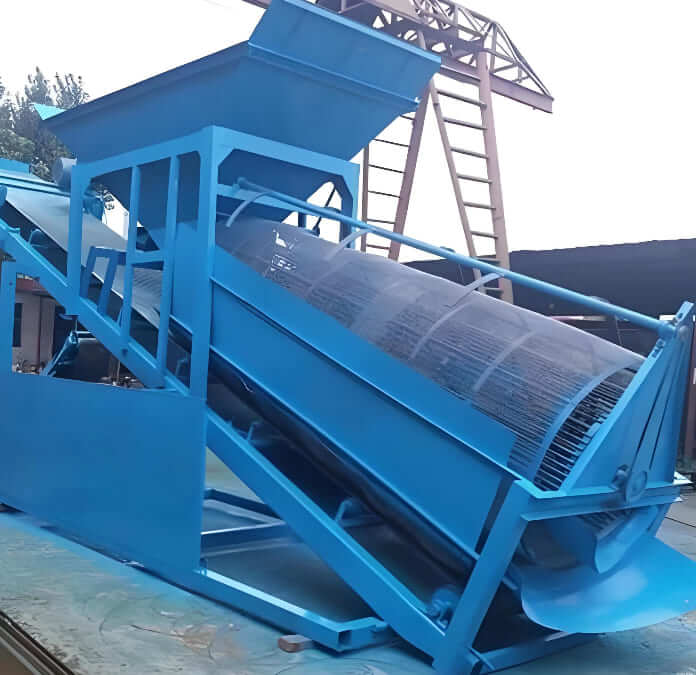
(3) Material Leaking From Both Ends of The Drum
Common Causes
- Damage to the seals at both ends of the drum (such as aging and cracking of the rubber retaining ring, wear of the felt seal).
- Misalignment between the feed end and the drum (the hopper is not aligned with the center of the drum, and material overflows from the side).
- Drum deformation (the bending of the drum body causes uneven gaps between the ends and the frame, with a huge gap on one side).
Solutions
- Replace the seals: Replace the aging rubber retaining ring with a wear-resistant polyurethane material, or install a stainless steel scraper at the edge (to reduce material adhesion).
- Calibrate the hopper: Adjust the position of the hopper so that its center is aligned with the drum axis, and the gap between the edge and the drum is controlled at 5-10mm.
- Repair the drum: Slight deformation can be corrected by adjusting the position of the support rollers (offset < 5mm), while severe bending requires factory repair or replacement of the drum body.
2. Equipment Malfunction
Abnormal vibrations, unusual noises, or excessive heating during operation indicate potential mechanical problems. Such symptoms may develop gradually or appear abruptly, signaling misalignment, worn parts, or lubrication failure. Proactive inspection and timely intervention are essential to prevent costly downtime or equipment damage.
(1) Abnormal Vibration During Operation
Common Causes
- Drum center of gravity offset (uneven wear of support rollers, loose bearing seat, or uneven accumulation of material inside the drum).
- Loose anchor bolts (long-term vibration causing the frame fixing bolts to strip or break).
- Transmission system imbalance (misalignment of the motor and reducer coupling, deviation > 0.2mm).
Solutions
- Balance the drum: Clean residual material inside the drum, check the wear of the support rollers (replace if wear > 3mm), adjust the height of the support rollers to ensure the drum’s horizontal deviation ≤ 1mm/m.
- Tighten the frame: Re-tighten the anchor bolts with a torque wrench (according to the equipment’s required torque, e.g., M20 bolts require 300-400 Nm), replace broken bolts with high-strength bolts (grade 8.8 or higher).
- Calibrate the coupling: Measure the radial and axial deviation of the motor and reducer shafts with a dial indicator, and adjust to within the allowable range (radial ≤ 1mm, axial ≤ 0.05mm).
(2) Abnormal Noise
Common Causes
- Friction between the support rollers and the drum (lack of lubrication on the support roller surface, or the retaining wheel is in too tight contact with the drum edge).
- Foreign objects inside the drum (such as metal blocks, large pieces of material stuck between the screen and the inner wall).
- Bearing damage (cracked balls in the support roller bearing or motor bearing, producing a “clicking” sound during operation).
Solutions
- Lubricate the support rollers: Add lithium-based grease (such as 3# lithium-based grease) to the support roller bearings, and adjust the clearance of the guide rollers (maintain a 2-3mm gap from the drum edge to avoid hard contact).
- Remove foreign objects: After stopping the machine, open the drum inspection port, remove any jammed foreign objects, and check if the screen is scratched (repair if necessary).
- Replace bearings: Disassemble the bearing housing and replace it with the same type of bearing (such as the 22320 self-aligning roller bearing commonly used for support rollers), ensuring that the bearing clearance meets the standard (0.05-0.1mm) during installation.
(3) Component Overheating
Common Causes
- Poor lubrication (bearing lack of oil, grease deterioration, or contamination).
- Motor overload (excessive feed rate, current exceeding 1.2 times the rated value).
- Poor heat dissipation (motor fan damage, bearing housing covered by material, preventing heat dissipation).
Solutions
- Replace the grease: Clean out the old grease from the bearing and add new grease (filling amount is 1/2-2/3 of the bearing cavity), avoiding mixing different types of grease (e.g., calcium-based grease and lithium-based grease should not be mixed).
- Reduce the load: Reduce the feed rate to the rated value (by adjusting the feed valve), check if there is any material jamming the drum (clean it before restarting).
- Improve heat dissipation by repairing the motor fan, cleaning the material accumulation from the surface of the bearing housing, and installing a cooling fan or water cooling jacket in high-temperature environments.
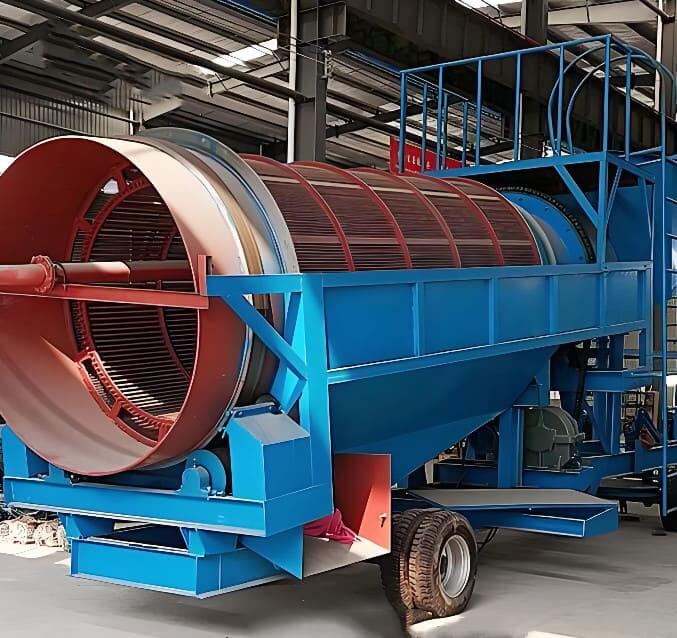
3. Transmission System Faults
The motor, reducer, and chain drive form the core power transmission unit. Issues like motor malfunction, oil leaks, or chain slippage can halt entire operations immediately. Regular maintenance and early fault detection minimize unexpected disruptions and prolong component lifespan.
(1) Motor Fails to Start or Stops Immediately After Starting
Common Causes
- Circuit fault (power phase loss, contactor damage, overload protector tripping).
- Drum jammed (material solidified or foreign objects stuck inside the drum, resistance exceeding motor torque).
- Motor winding burnout (long-term overload or moisture leading to insulation breakdown).
Solutions
- Troubleshoot the circuit: Use a multimeter to check the three-phase voltage of the power supply (ensure 380V±5%), replace the damaged contactor or reset the overload protector (setting value is 1.1-1.2 times the motor’s rated current).
- Clear the jam: Manually rotate the drum (power must be off), clean solidified material or foreign objects inside the drum, and disassemble the drum end cover if necessary.
- Repair the motor: Burned-out windings need to be rewound (according to the original number of turns and wire diameter), or replace with a motor of the same power (pay attention to the protection level, such as IP54 or higher for outdoor use).
(2) Gearbox Oil Leakage or Abnormal Noise
Common Causes
- Seal aging (input shaft/output shaft oil seal wear, leading to gear oil leakage).
- Poor gear meshing (gear wear, broken teeth, or insufficient oil leading to dry friction).
- Bearing damage (excessive bearing clearance inside the gearbox, causing axial movement during operation).
Solutions
- Replace seals: Replace the aging skeleton oil seal with a fluororubber material (better temperature resistance), and install it with the lip facing the oil chamber.
- Inspect gears: Add gear oil to the oil level line (use medium-duty industrial gear oil CKC 220#). Severely worn gears need to be replaced in pairs (to avoid meshing deviation caused by single replacement).
- Replace bearings: Disassemble the gearbox, replace the tapered roller bearings (such as 30208), and adjust the bearing clearance to 0.02-0.05mm.
(3) Chain Drive Skipping Teeth or Breaking
Common Causes
- Poor engagement between the chain and sprocket (loose chain, worn and sharpened sprocket teeth).
- Insufficient chain lubrication (long-term lack of oil leading to wear of chain links and rusting of pins).
- Tensioning device failure (broken tensioner spring, loose chain).
Solutions
- Adjust the chain: Tighten the chain using the tensioning device (sag should be controlled within 1-2% of the chain length). Severely worn chains and sprockets need to be replaced as a set.
- Regular lubrication: Apply special chain lubricant (such as extreme pressure lithium-based grease) to the chain pins; avoid using general grease (which easily attracts dust).
- Repair the tensioning device: Replace the broken spring and ensure that the tensioner wheel is in close contact with the chain (even pressure).
Résumé
Sustaining smooth trommel screen operation demands vigilance across screening performance, mechanical stability, and drive system health. By promptly diagnosing causes—whether mesh wear, imbalance, lubrication gaps, or alignment errors—operators can apply targeted fixes. Routine inspections, balanced feeding, and scheduled part replacements form the foundation of preventative maintenance, ensuring continuous productivity and minimizing unplanned downtime.
DERNIERS PRODUITS
-

Inclined Vibrating Screen
The inclined vibrating screen is a simple and eff…
-
High Temperature & Pressure Gold Desorption Electrolysis System
High-Temperature & Pressure Gold Desorption Elect…
-
Normal Temperature & Pressure Gold Desorption Electrolysis System
The normal temperature & pressure gold desorption…


DERNIÈRES NOUVELLES
- Traditional De-cyanidation Technologies for Gold Cyanide Residues
- Shaking Table, 3-Disc Dry Magnetic & Electrostatic Separator for W-Sn-Ta-Nb
- Mineral Analysis: The Foundation for Successful Mineral Processing Projects
- What Is Over-Grinding and How Can It Be Prevented?
- Fluorspar vs Graphite vs Quartz: Non-Metal Minerals Beneficiation Differences
 English
  French
  Spanish
  Portuguese
  Indonesian